知识库全流程实操 Knowledge Base End-to-End Practice v1.0

基于第二大脑的企业级知识系统 An Enterprise Knowledge System Built on 2Brain

OpenClaw 联动第二大脑实现 · 文件入库 · 智能体对话 · 关键词图谱 OpenClaw × 2Brain · File Upload · Agent Q&A · Keyword Graph
Bobby
2026 年 6 月 June 2026

目录 Outline

01

第二大脑介绍

Introducing 2Brain

02

第二大脑平台速览

A Quick Tour of the 2Brain Platform

03

知识系统 API 全景

Knowledge System API Overview

04

OpenClaw 联动演示:资料入库 · 智能体问答 · 关键词图谱

OpenClaw Integration Demos: Upload · Agent Q&A · Keyword Graph

05

作业安排

Homework

第二大脑 · 用 AI 构建企业级多模态知识管理系统 2Brain · An Enterprise-Grade Multimodal Knowledge Management System Powered by AI

Capture · 获取Capture

强力构建多模态知识库 Build a powerful multimodal knowledge base

  • 文本类型支持(pdf / ppt / doc / xls / txt / epub)
  • Text formats (pdf / ppt / doc / xls / txt / epub)
  • 音视频链接 + 文件导入(B 站 / 小红书)
  • Audio & video links and files (Bilibili / Xiaohongshu)
  • OCR 文件及图片导入
  • OCR of files and images
  • 微信知识导入(聊天记录 / 公众号 / 文件)
  • WeChat content (chats / official accounts / files)
  • 网站链接 + 全站导入(1–5 层深度)
  • URLs and full-site crawl (1–5 levels deep)

Organize · 组织Organize

清晰准确灵活地管理知识 Manage knowledge clearly, accurately, and flexibly

  • 多知识库任意组合
  • Combine multiple knowledge bases freely
  • 对音视频文档提供纠错服务
  • Correction service for audio/video transcripts
  • 灵活启用相关文件进行问答
  • Selectively enable files for Q&A

Distill · 提炼Distill

自动提炼和转化知识 Distill and transform knowledge automatically

  • 独创关键词图谱,内容侧重点清晰可见
  • Proprietary keyword graph — content focus made visible
  • 自动构造全局问题引擎
  • Auto-built global question engine
  • 推荐问题集让沟通更易起步
  • Recommended question sets to kick off conversations

Express · 表达Express

精确而有效地表达知识 Express knowledge precisely and effectively

  • 问答对模式精确匹配预置答案
  • Q&A-pair mode for exact preset answer matching
  • 知识库问答引用文件及段落溯源
  • Knowledge-base Q&A with file and paragraph traceability
  • 意图引擎,提供基于事实的洞察
  • Intent engine, delivering fact-based insights
  • 引入互联网来源,动态知识库
  • Live web sources for a dynamic knowledge base

RAG,正是 Capture → Organize → Express 这条链路背后的引擎。 RAG is precisely the engine behind the Capture → Organize → Express chain.

今天完成一个知识库操作流程 Today: A Complete Knowledge Base Workflow

平台 UI 做准备 Prepare on the Platform UI

在第二大脑里创建知识库、创建对话智能体,并为每个对外能力生成一把 API Key。

In 2Brain, create a knowledge base, create a chat agent, and generate an API Key for each capability you need.

看懂 3 个对外 API Understand 3 Public APIs

上传文件、发起对话、关键词图谱——本节课用到的 3 个动作都能被 OpenClaw 调起来。

Upload File, Chat, Keyword Graph — all three are callable by OpenClaw.

用 OpenClaw 联动 Drive the Flow with OpenClaw

OpenClaw 联动第二大脑实现资料入库、智能体问答、查看关键词图谱。

Use OpenClaw to upload files, run agent Q&A, and fetch the keyword graph from 2Brain.

第二大脑平台速览 A Quick Tour of the 2Brain Platform

登录后按这条路径过一遍,结束时你会拥有:1 个知识库 + 1 个对话智能体 + 3 把 API Key Walk through this path after login. By the end you will have: 1 knowledge base + 1 chat agent + 3 API Keys.

01

创建知识库 Create Knowledge Base

知识库是资料的容器,按主题划分。

A knowledge base is a topical container for your materials.

02

上传文件 Upload Files

把准备好的资料上传进去,等解析完成。

Upload your materials and wait for parsing to finish.

03

生成关键词图谱 Generate Keyword Graph

基于已入库的文件自动生成关键词节点与关联。

Auto-generated keyword nodes and relations from your files.

04

创建对话智能体 Create Chat Agent

新建一个智能体并绑定到刚才那个知识库。

Create an agent and bind it to that knowledge base.

05

发起对话 Try a Chat

直接在平台里问一两个问题,确认知识库能答上来。

Ask one or two questions on the platform to confirm the agent answers from your KB.

06

进入工作台 Open the Dashboard

查看平台开放了哪些 API、对应文档在哪里。

See which APIs are available and where the docs live.

07

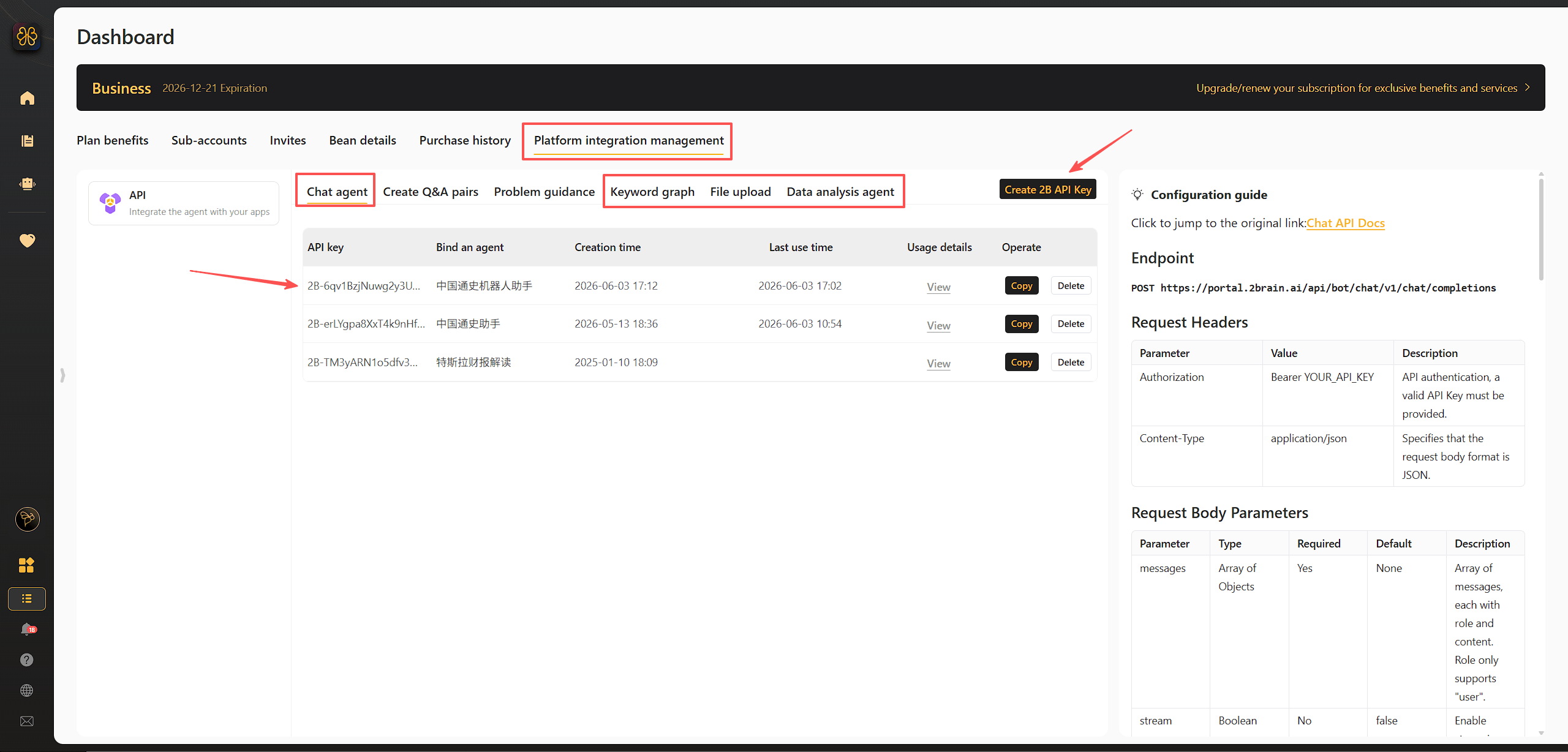
创建 3 把 API Key Create 3 API Keys

上传 / 对话 / 图谱——本节课要用到的 3 把,分别绑定对应对象。

Upload / Chat / Graph — the three keys this class needs, each bound to the matching object.

08

把 Key 备好 Save the Keys

复制并妥善保存,等下交给 OpenClaw 用。

Copy and save them — you'll hand them to OpenClaw next.

2Brain · API Key creation page

知识系统 API 全景 Knowledge System API Overview

第二大脑对外开放了不少 API,今天主要聚焦文件入库 + 发起对话 + 查看关键词图谱。 2Brain exposes many APIs. Today we focus on File Upload + Chat + Keyword Graph.

上传文件至指定知识库 Upload File to a Knowledge Base

把外部资料推到某个知识库里,等待解析。

Push external materials into a specific knowledge base and let it parse.

对话智能体发起对话 Chat with an Agent

向指定的对话智能体提问,拿到答案与来源。

Ask a specific chat agent and receive an answer along with the source.

基于知识库生成关键词图谱 Generate Keyword Graph from a KB

拉取该知识库的关键词节点与关联关系。

Fetch the knowledge base's keyword nodes and their relations.

对话智能体问题指南生成 Agent Suggested-Question Generator

让智能体基于自己的知识库,生成推荐提问。

Have the agent generate suggested questions based on its own knowledge base.

演示 1 · OpenClaw 联动「资料入库」 Demo 1 · OpenClaw × 2Brain · File Upload

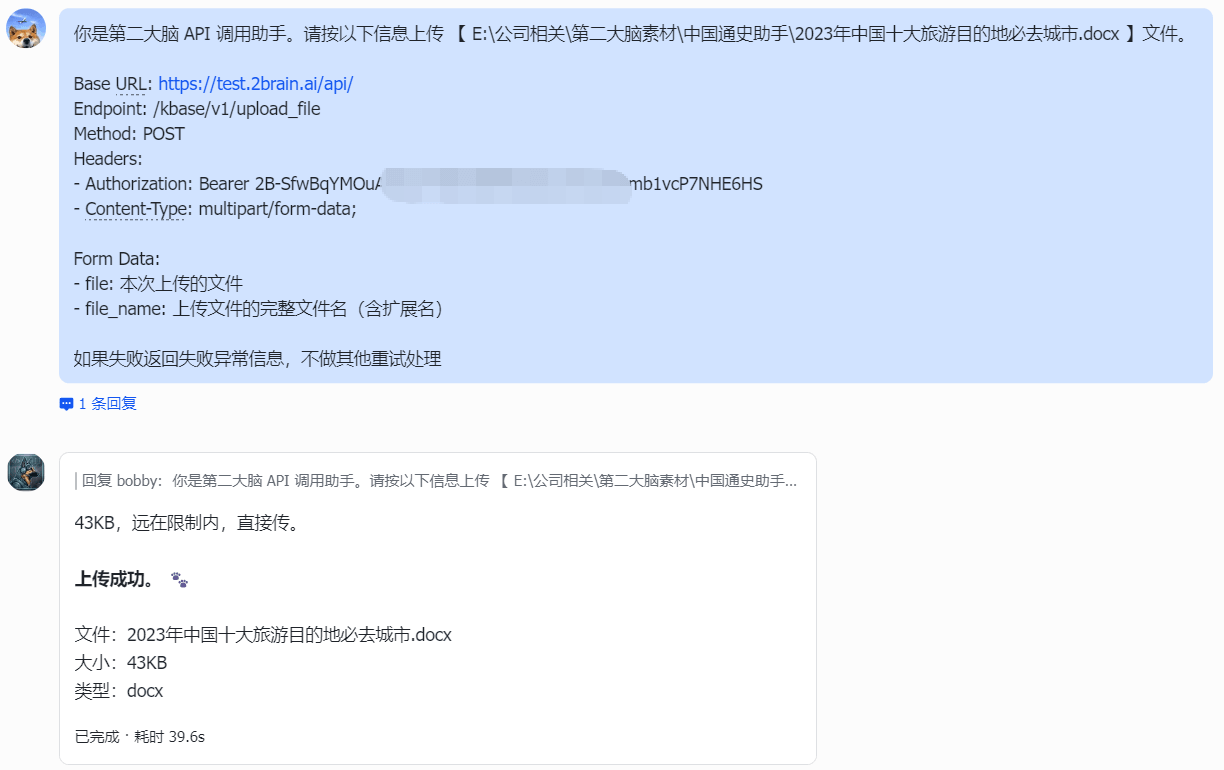
前置:已准备好「上传文件」API Key。 Prerequisite: the "Upload File" API Key is ready.

你是第二大脑 API 调用助手。请按以下信息上传 "本地文件路径,如:E:\中国通史助手\2023年中国十大旅游目的地必去城市.docx" 文件。

Base URL: https://test.2brain.ai/api/
Endpoint: /kbase/v1/upload_file
Method: POST
Headers:
- Authorization: Bearer 【填入你的「上传文件」API Key】
- Content-Type: multipart/form-data

Form Data:
- file: 本次对话上传的文件
- file_name: 上传文件的完整文件名(含扩展名)
You are a 2Brain API calling assistant. Please upload the file at the path below.
Local file path (example): E:\China_History_Assistant\Top_10_Travel_Cities_2023.docx

Base URL: https://test.2brain.ai/api/
Endpoint: /kbase/v1/upload_file
Method: POST
Headers:
- Authorization: Bearer [your "Upload File" API Key]
- Content-Type: multipart/form-data

Form Data:
- file: the file attached to this conversation
- file_name: the full filename including extension
STEP 1

OpenClaw 调用上传 API OpenClaw calls the Upload API

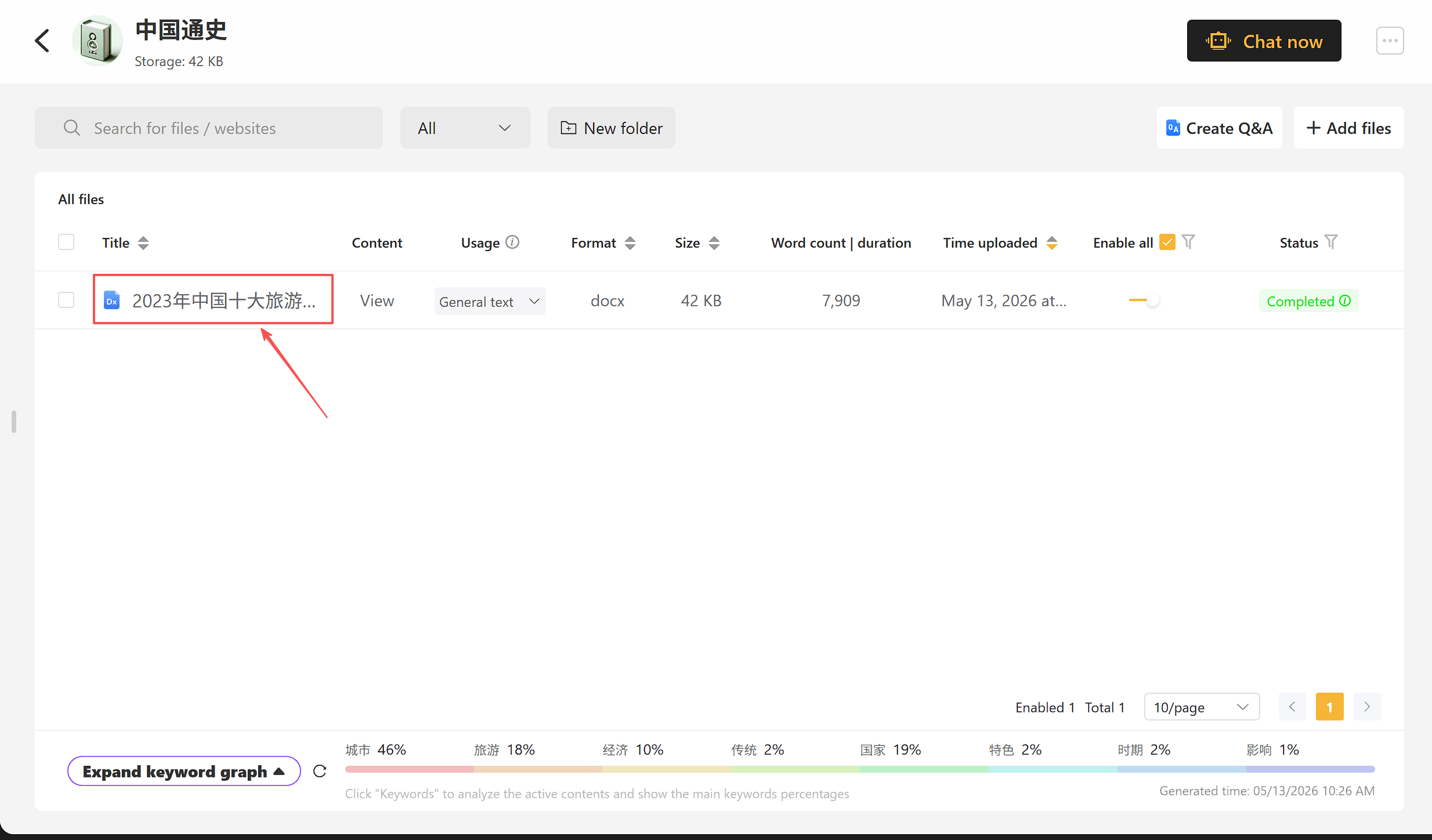
STEP 2

平台 UI 验证 Verify on the Platform UI

到第二大脑知识库文件列表,确认文件已挂载。

Open the 2Brain knowledge base file list and confirm the file is in.

OpenClaw upload API call result Platform knowledge base file list

演示 2 · OpenClaw 联动「智能体问答」 Demo 2 · OpenClaw × 2Brain · Agent Q&A

前置:已准备好对话智能体的「发起对话」API Key。 Prerequisite: the chat agent's "Chat" API Key is ready.

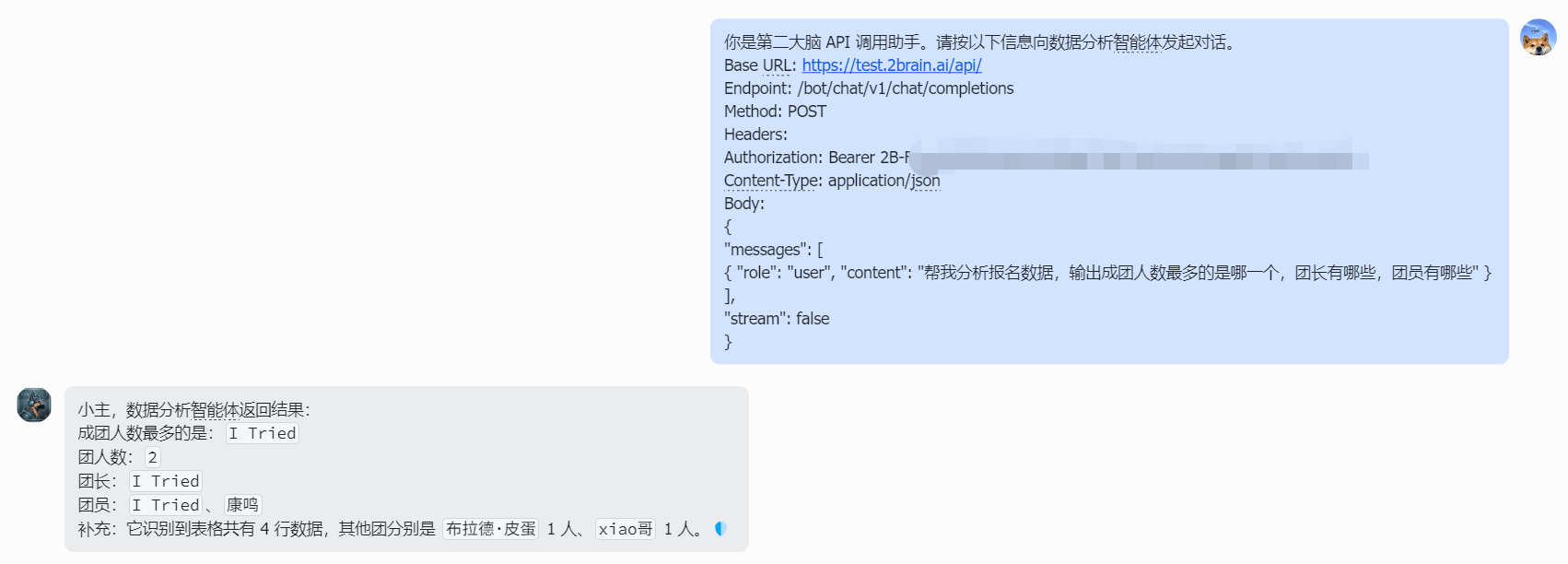
你是第二大脑 API 调用助手。请按以下信息向对话智能体发起一次非流式对话。

Base URL: https://test.2brain.ai/api/
Endpoint: /bot/chat/v1/chat/completions
Method: POST
Headers:
- Authorization: Bearer 【填入你的「发起对话」API Key】
- Content-Type: application/json

Body:
{
  "messages": [
    { "role": "user", "content": "【填入要问的问题】" }
  ],
  "stream": false
}
You are a 2Brain API calling assistant. Please send one non-streaming chat to the agent below.

Base URL: https://test.2brain.ai/api/
Endpoint: /bot/chat/v1/chat/completions
Method: POST
Headers:
- Authorization: Bearer [your "Chat" API Key]
- Content-Type: application/json

Body:
{
  "messages": [
    { "role": "user", "content": "[your question here]" }
  ],
  "stream": false
}
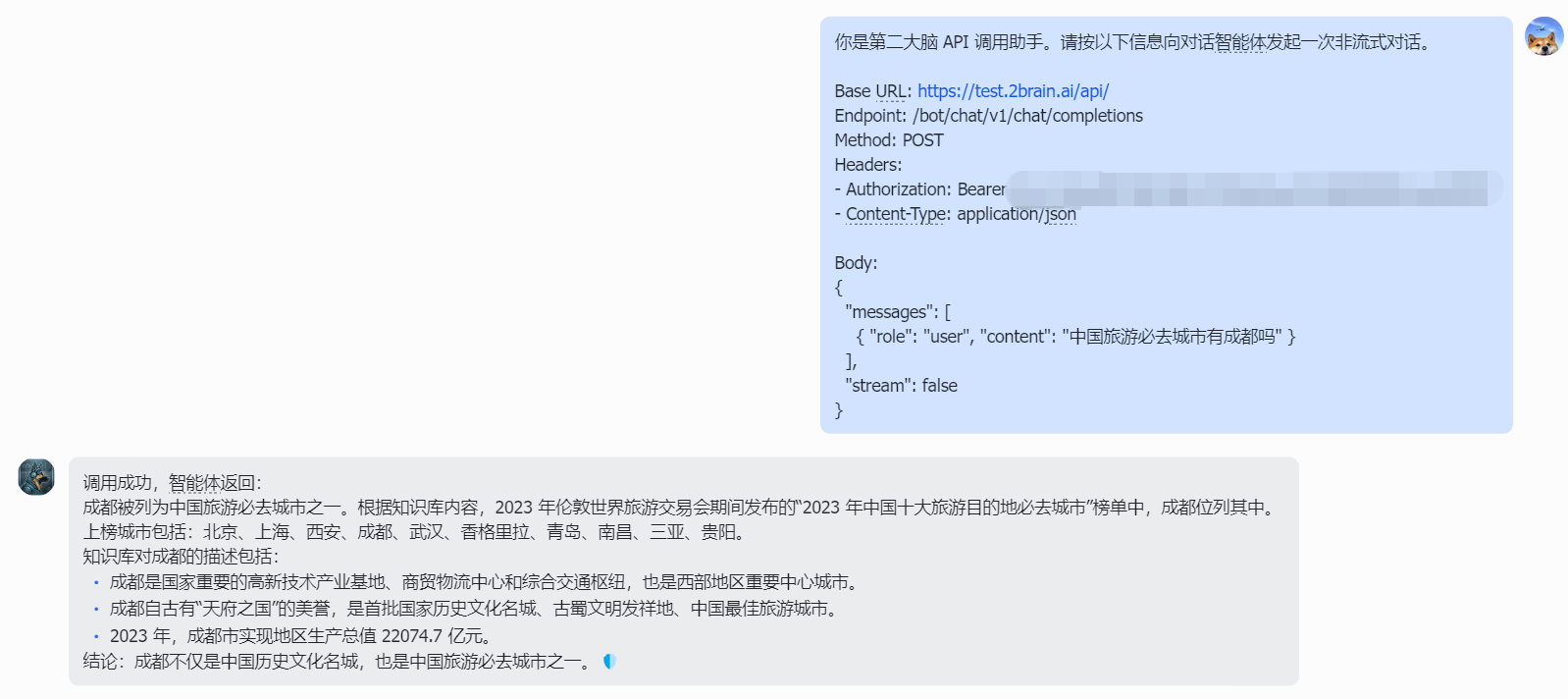
STEP 1

OpenClaw 调用对话 API OpenClaw calls the Chat API

STEP 2

平台 UI 复核 Cross-check on the Platform UI

到平台问答入口提同样的问题,比对回答一致性。

Ask the same question on the platform's Q&A entry and compare answers.

截图占位 ①:OpenClaw 调用回执(等修复接口后补) Screenshot placeholder ①: OpenClaw call result (to be added once the API is fixed)
Platform Q&A comparison result

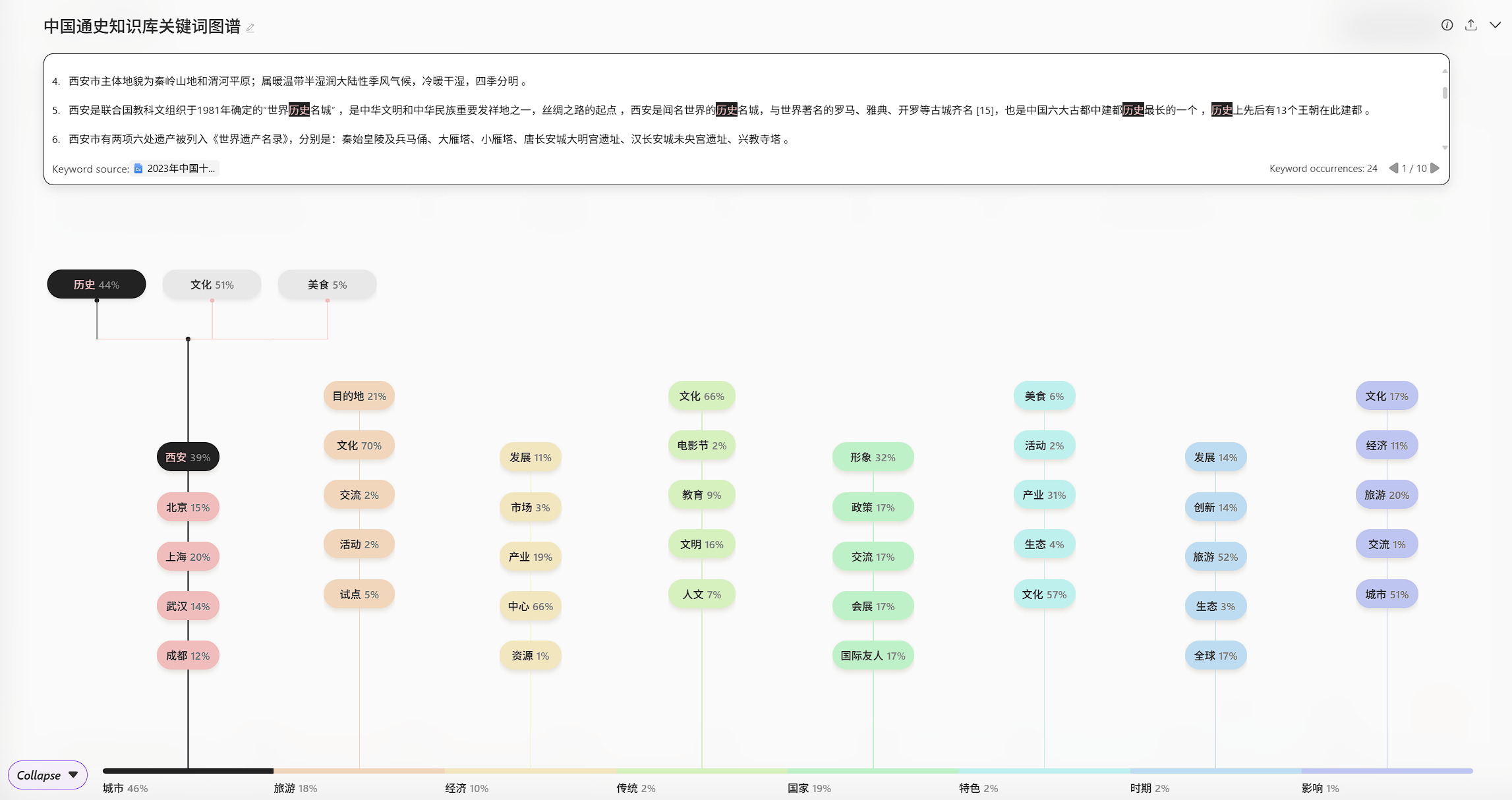
演示 3 · OpenClaw 联动「关键词图谱」 Demo 3 · OpenClaw × 2Brain · Keyword Graph

前置:已准备好「关键词图谱」API Key。 Prerequisite: the "Keyword Graph" API Key is ready.

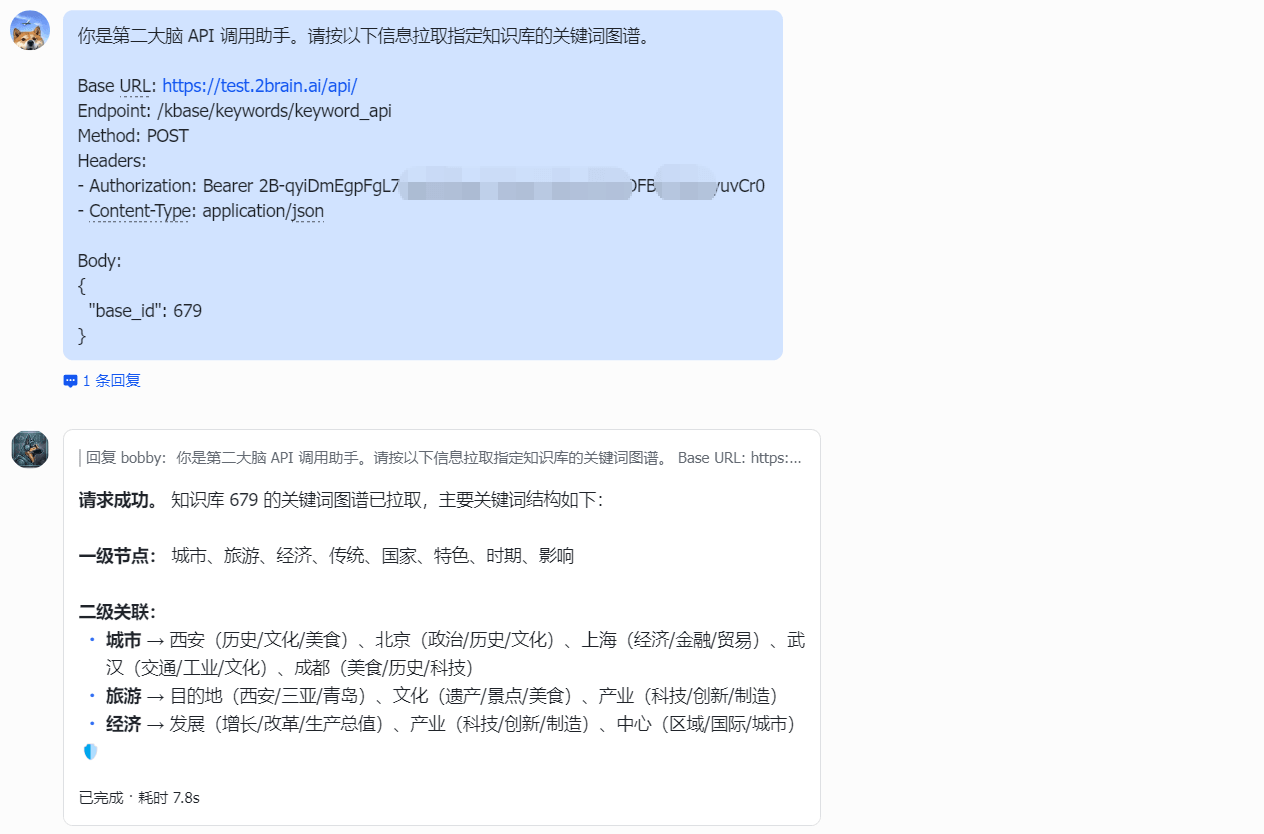
你是第二大脑 API 调用助手。请按以下信息拉取指定知识库的关键词图谱。

Base URL: https://test.2brain.ai/api/
Endpoint: /kbase/keywords/keyword_api
Method: POST
Headers:
- Authorization: Bearer 【填入你的「关键词图谱」API Key】
- Content-Type: application/json

Body:
{
  "base_id": 【填入知识库 ID】
}
You are a 2Brain API calling assistant. Please fetch the keyword graph of the given knowledge base.

Base URL: https://test.2brain.ai/api/
Endpoint: /kbase/keywords/keyword_api
Method: POST
Headers:
- Authorization: Bearer [your "Keyword Graph" API Key]
- Content-Type: application/json

Body:
{
  "base_id": [knowledge base ID]
}
STEP 1

OpenClaw 调用图谱 API OpenClaw calls the Graph API

STEP 2

平台 UI 对照 Compare on the Platform UI

到平台关键词图谱页面,比对返回内容与可视化图谱。

Open the platform's keyword graph page and compare the response with the visualization.

OpenClaw keyword graph API result Platform keyword graph page

作业 Homework

作业内容 Tasks

第二大脑平台完成知识库创建、对话智能体创建
Create a knowledge base and a chat agent on the 2Brain platform.
OpenClaw 中实现文档上传 + 问答 + 图谱获取
Use OpenClaw to upload a document, run agent Q&A, and fetch the keyword graph.
测试 3–5 个问题对话,每题附召回结果并做准确率自评
Run 3–5 test questions; for each, attach the recalled sources and self-assess accuracy.

提交方式 Submission

操作截图 / 录制视频

Screenshots or screen recording

截止时间 Deadline

2026 年 6 月 16 日 9:25(CN)

2026 年 6 月 15 日 21:25(NY)

June 16, 2026 · 09:25 (CN)

June 15, 2026 · 21:25 (NY)